






When it comes to fast, accurate, and portable 3D scanning for architecture, forensics, construction, and visualization, the XGRIDS PortalCam stands out as a powerful and easy-to-use solution. Whether you’re capturing indoor environments or outdoor spaces, this system is designed to deliver precise spatial data in minutes.
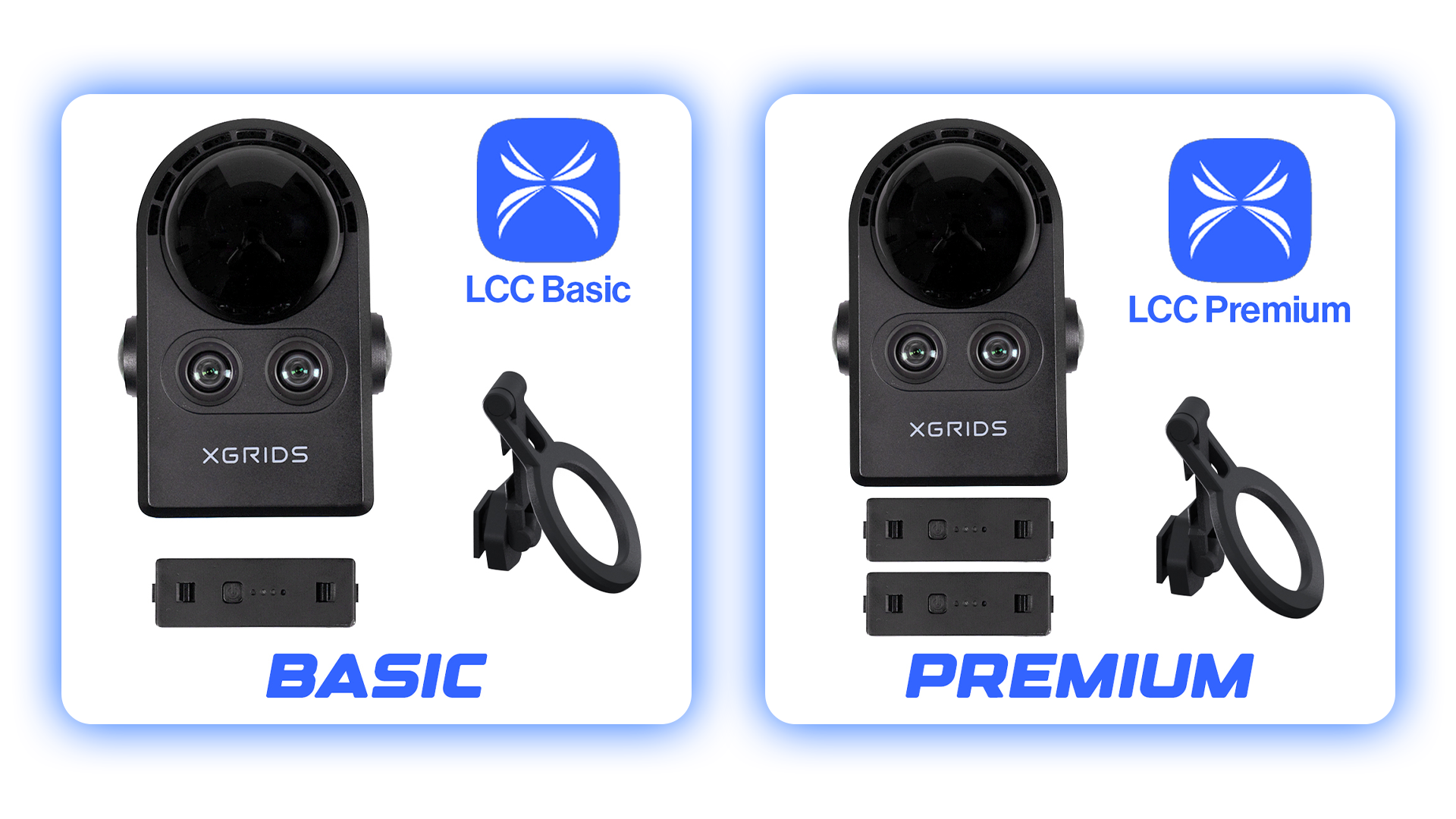
Two Options: Standard vs. Premium PortalCam Kits
The XGRIDS PortalCam is available in two configurations — Standard and Premium. Both kits include the core PortalCam device and essential accessories to get you scanning right out of the box.
Here’s how they differ:
-
PortalCam Standard Kit:
Includes the essential components for accurate and reliable 3D environment capture. Ideal for users who need a cost-effective, professional-grade system for visualization, measurement, and scene documentation. -
PortalCam Premium Kit:
Includes everything in the Standard Kit plus an additional battery for extended scanning sessions and an upgraded 12-month LCC Studio Premium subscription — providing enhanced software functionality, faster processing, and additional cloud features for managing projects efficiently.
Choosing the Right Kit for Your Needs
If you’re conducting quick site captures, training sessions, or occasional 3D documentation, the Standard Kit is a great choice.
For professionals who require extended field use, advanced software capabilities, and seamless data management, the Premium Kit delivers the best performance and value.
|
Item |
Standard Kit |
Premium Kit |
|
PortalCam |
1 |
1 |
|
Tripod |
1 |
1 |
|
Battery |
1 |
2 |
|
Battery Charger |
1 |
1 |
|
Mobile Phone Mount Module |
1 |
1 |
|
Type-C Cable |
1 |
1 |
|
Type-C to Type-A Cable |
1 |
1 |
|
Protective Cover |
1 |
1 |
|
Case |
1 |
1 |
|
LCC Studio Subscription |
12-Month Basic |
12-Month Premium |
LCC Studio Basic (Standard)” vs “Premium” get you (software features)
With Lixel CyberColor Studio, there are two tiers — “Standard/Basic” and “Premium.” The difference is mostly about advanced processing, fusion, BIM/workflow integration, and more complex project support.
What Basic / Standard (with Standard Kit) does:
- Create and view 3D models from scan data captured with PortalCam — using Gaussian Splatting (3DGS) technology.
- Basic editing tools: you can crop, annotate, measure, and do fundamental edits to the 3D model.
- Create camera paths / fly-throughs, simulate collisions, do interactive walkthroughs / “avatar” tours of the scanned space, add simple asset overlays (e.g. .FBX/.OBJ/.GLB import), export in standard formats (e.g. .PLY or the proprietary .LCC), and share/publish to cloud or web viewers.
This is great if your goal is fairly straightforward: “scan → get a 3D model → edit / view / share / walkthrough.” Works well for quick captures, real-estate tours, simple virtual-space exports, small projects.
What Premium (with Premium Kit) adds — for advanced / professional workflows:
- Map Fusion: ability to combine multiple scans (e.g. several PortalCam passes) into a coherent 3D model. Useful if scanning large or complex spaces.
- Aerial-Ground Fusion: ability to merge ground-level scan data with aerial/drone data — good for big properties, multi-level sites, or outdoor+indoor capture.
- HD-Enhancement / Aerial Reconstruction / More refined detail processing — helps generate higher-fidelity models (textures, lighting, detail) useful for film, VR/AR, game assets, digital twins, etc.
- Cluster Mode / Multi-GPU / Multi-node processing for large/complex projects (makes processing faster and feasible when dealing with large datasets).
- Spatial Recognition & Analysis Tools / BIM Workflow Integration — e.g. the software includes a plugin for Autodesk Revit so you can import spatial scans directly into a BIM environment. Very useful for architecture, construction, building documentation.
- Better export & integration options — more robust support for 3D workflows, game engines (e.g. Unreal Engine, Unity), WebGL/web sharing, VR/AR platforms, and ability to produce “production-ready” 3D assets.
So the Premium version is built for complex, large-scale, professional workflows — where you may need high-detail reconstructions, merging different data sources (drone + ground), integration to BIM/game pipelines, or efficient handling of large data volumes.
Which one should you get — Standard or Premium?
- Get Standard Kit + Basic LCC if you want a lightweight, simpler workflow: quick scanning, simple 3D model generation/editing, basic real-estate tours, small VR/AR scenes, or occasional projects.
- Choose Premium Kit + Premium LCC if you plan to do more advanced work — large spaces, multiple scans, aerial + ground capture, high-detail models for film/game/BIM, or you want to integrate with existing 3D/CAD/BIM workflows (like via Revit, Unity/Unreal, etc.).
In short: Standard = quick, easy, simple; Premium = advanced, flexible, powerful.

Why Buy from Rapid Scan 3D
Rapid Scan 3D is a trusted reseller of XGRIDS 3D scanning systems, including the PortalCam Standard and Premium Kits. With over a decade of industry experience, Rapid Scan 3D provides expert guidance, competitive pricing, and full customer support — ensuring you get the right scanning solution for your workflow.
As a leading provider of 3D scanning, inspection, and reverse engineering solutions, Rapid Scan 3D also offers complementary products and software integrations — including Geomagic Design X, Scantech handheld scanners, and automation systems like AM-DESK.
Ready to Get Started?
Contact Rapid Scan 3D today to learn more about the XGRIDS PortalCam and discover which kit best fits your needs.
We’re here to help you capture, analyze, and innovate with confidence.